The Guide Strength Wasn’t Killing the Camera. The Prompt Was.
AI video clips that read as slow dissolves instead of moving shots. Lowering the keyframe guide strength changed motion energy by 0.03; adding one camera sentence at the same strength changed it 18x. Ten-bucket motion measurements for every configuration.
TL;DR — An image-to-video chain was producing clips where the camera barely moved: measured motion energy 1.7 against a reference of 19.8. The obvious suspect was the keyframe guide strength, pinned at 1.0. Lowering it to 0.75 moved motion from 0.41 to 0.41 — nothing. Adding one sentence describing the camera, at the same strength, took it to 7.56. The final pass, strength 0.7 plus that sentence, hit 15.7–20.7 per clip — reference range. The knob everyone reaches for was not the knob.
This continues the measured-corrections thread on this site — see holding one character across separate cuts, bridging two unrelated keyframes, and what actually fits in 16GB. Same rig, same habit of measuring before believing.
The complaint, and how to turn it into a number
The clips looked fine as stills and dead as video. Described from the outside: "the colour is good, but it doesn't have the natural scene transitions the earlier pipeline had."
"Natural transition" is not measurable. What is measurable is how much the frame changes over time:
Motion energy — convert each frame to greyscale, resize to 160 px on the long edge, take the mean absolute difference between a frame and the frame n seconds later, and average within each of ten equal buckets across the clip.
Two spacings are used below and they are not comparable to each other, so each table says which:
- Adjacent frames at 24 fps (≈0.042 s apart) — small numbers, sensitive to per-frame jitter.
- 0.25 s apart (6 frames at 24 fps) — larger numbers, closer to what the eye reads as camera travel.
Ten buckets rather than one average matters as much as the average, because it shows the shape. A clip that moves hard in the middle and freezes at both ends averages the same as one that glides evenly, and only one of those looks right.
Where the pipeline was
A first/last-frame chain: generate high-resolution anchor stills, then have the video model interpolate between consecutive anchors, then concatenate. The guide node takes a strength parameter controlling how hard each end is pinned to its anchor. It was set to 1.0, which produced excellent anchor adherence and excellent seams.
Adjacent-frame measurements across four configurations of the same shot:
| Configuration | Ten buckets | Mean | Shape |
|---|---|---|---|
| Earlier pipeline (called "natural") | 1.3 3.4 5.2 7.1 7.7 8.3 5.0 2.4 0.8 0.0 | 4.1 | roughly linear |
| Wan 2.2 first/last | 5.2 6.1 8.0 10.1 9.7 8.1 12.1 9.1 8.3 7.6 | 8.4 | stalls, then jumps late |
| Two-stage, strength 0.7 | 2.2 4.9 8.6 8.2 5.6 4.1 1.4 0.5 0.5 0.4 | 3.6 | front-loaded, dead ending |
| Single-stage, strength 1.0 | 0.0 0.3 0.6 0.4 0.6 0.5 0.4 0.1 0.2 0.0 | 0.3 | flat |
The current pipeline was moving an order of magnitude less than the version it replaced. Watching it back with that in hand, the description writes itself: the camera does not travel at all. It is a slow dissolve between two stills. The earlier pipeline's "naturalness" was never a transition property — it was a continuously moving camera carrying the transition along with it.
The two-stage run at strength 0.7 had four times the early motion. So the working hypothesis was straightforward: strength 1.0 is pinning both ends so hard that nothing in between is free to move.
Testing the strength hypothesis
Same anchor pair, same resolution, same seed, 121 frames at 24 fps. Three variants, of which two ran before the result was clear enough to stop:
| Variant | Ten buckets (adjacent frames) | Mean | Anchor adherence (start / end) |
|---|---|---|---|
| Strength 0.75, original prompt | 0.3 0.3 0.6 0.6 0.6 0.5 0.5 0.3 0.2 0.0 | 0.41 | 4.4 / 4.7 |
| Strength 0.75, camera-motion prompt | 0.2 5.2 16.7 13.4 17.2 15.0 7.4 0.3 0.2 0.0 | 7.56 | 4.5 / 4.7 |
Dropping strength from 1.0 to 0.75 on its own took the mean from 0.3 to 0.41. That is not a fix; that is noise. The hypothesis was wrong.
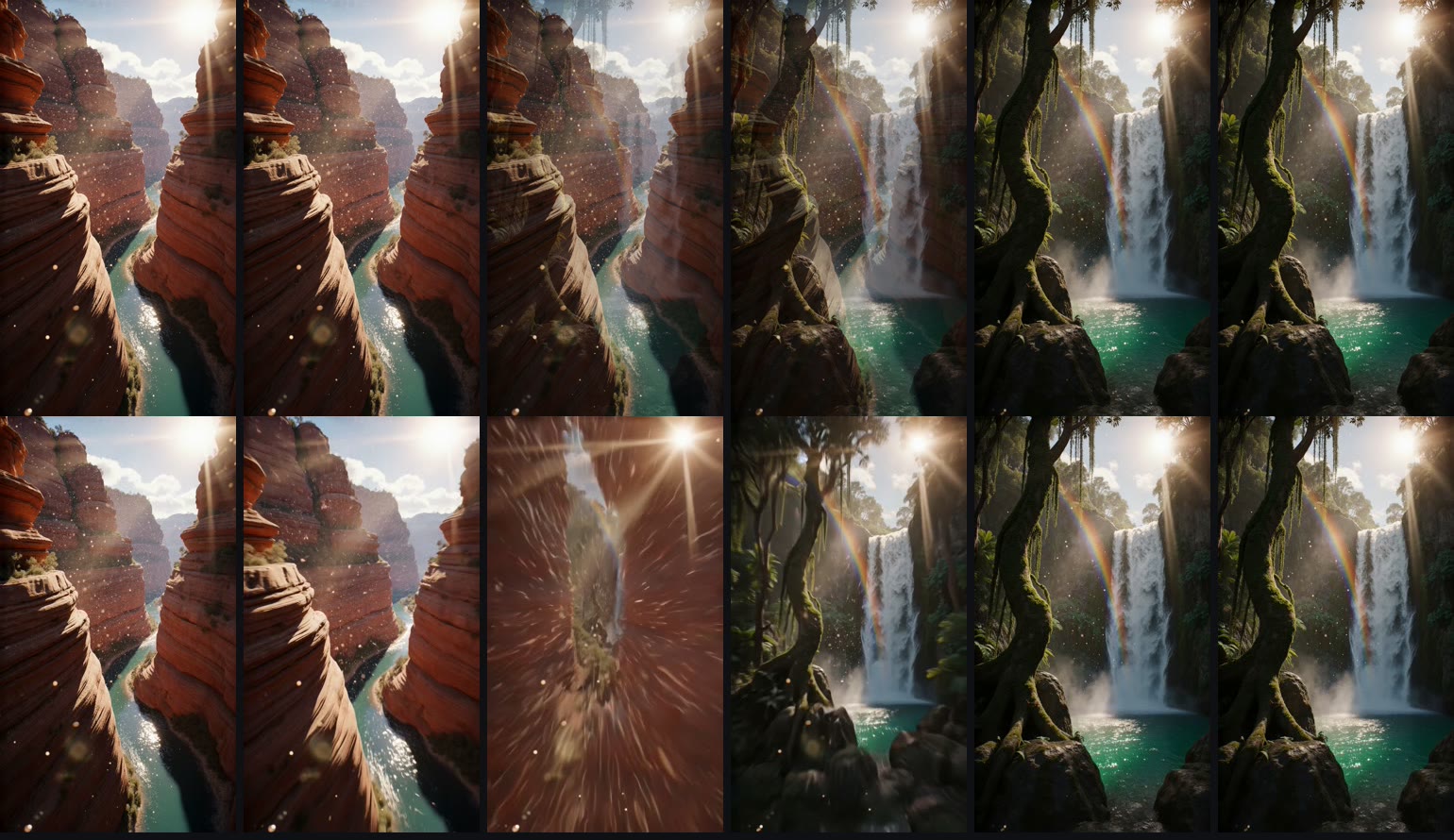
Holding strength at 0.75 and changing only the prompt took it to 7.56 — past the earlier pipeline's 4.1, an 18× change from the same parameter setting. And crucially, anchor adherence did not move: 4.4/4.7 before, 4.5/4.7 after. The motion was free.
Six evenly spaced frames from each clip, same anchors, same seed, same guide strength of 0.75. Top row: the original prompt — the frame is nearly unchanged for the first half. Bottom row: the camera-motion prompt — the canyon wall passes and the third frame shows the motion-blur streaking discussed below. Only the prompt differs.
The original video prompt said the camera "descends steadily and smoothly." The replacement says:
drone diving downward and forward at one constant high speed,
never slowing, never pausing, strong parallax
That is the whole difference. "Steadily and smoothly" reads to a video model as an instruction to be calm, and calm is what it delivered. The words that work are the ones that make stopping wrong: constant, never slowing, never pausing.
Two caveats visible in the buckets: the first 10% and last 30% are still near zero. The end guide holds those, and that is a separate effect from the one just fixed.
Confirming it on a second, independent shot
A different test generated from a reference frame, with three model configurations, measured at 0.25 s spacing:
| Configuration | Time | Ten buckets (0.25 s) | Mean | First-frame adherence |
|---|---|---|---|---|
| Start-frame only, strength 0.85, motion prompt | 182 s | 9.2 12.3 12.7 13.2 14.5 15.6 15.9 15.7 15.4 15.2 | 13.9 | 3.6 |
| First and last frame, 0.7 / 0.7 | 196 s | 15.6 14.9 15.0 14.4 13.8 13.9 14.1 13.9 6.1 5.5 | 13.1 | 4.9 (end 6.4) |
| Wan 2.2, start frame only | 470 s | 15.2 16.0 16.6 18.7 17.9 18.2 19.0 18.9 19.5 17.9 | 17.8 | 16.4 |
| Reference clip | — | 12.9 18.7 24.6 19.5 18.4 21.1 20.8 21.8 20.7 18.7 | 19.8 | — |
Three things fall out of this table.
The model was never the limitation. Given a strength of 0.85 and a camera sentence, the same model that produced 1.7 produces 13.9. The earlier result was a configuration, not a ceiling.
The end guide costs you the last 20%. The first/last variant tracks the start-only variant almost exactly for eight buckets, then drops to 6.1 and 5.5. That is the end anchor asserting itself. If you need a chain of clips that meet at shared anchors you pay this; if you only need one clip, dropping the end guide keeps it accelerating to the finish.
Highest motion is not automatically best. Wan 2.2 moves most (17.8, closest to the reference) and is unusable in an anchor chain, because its first-frame adherence is 16.4 — it repaints the opening frame's tone rather than starting from it. In a chain that shows up as a visible colour jump at every seam. The two LTX variants sit at 3.6 and 4.9.
The final pass
Applying strength 0.7 plus the motion prompt to all six clips of the real sequence, reusing the existing anchors:
| Clip | 1 | 2 | 3 | 4 | 5 | 6 |
|---|---|---|---|---|---|---|
| Motion (0.25 s) | 20.7 | 16.3 | 18.5 | 15.7 | 15.7 | 16.4 |
Against the same measurement: reference clip 19.8, previous version 1.7. A 9–12× increase across every clip.
What it cost, measured on the same run:
| Seams (frame-to-frame difference across each join) | Anchor adherence | Time per clip | |
|---|---|---|---|
| Strength 1.0 version | 1.9 / 2.3 / 2.5 / 2.3 / 3.1 | 3.6–4.5 | 182–188 s |
| Strength 0.7 + motion prompt | 5.0 / 4.4 / 5.6 / 4.7 / 4.7 | 4.6–5.9 | 187–250 s |
Seams roughly doubled and anchor adherence loosened by about a point. Both stayed under the threshold set in advance (seams below 6), and the joins remain invisible in playback. That is the actual trade: precision at the anchors buys stillness in between, and you almost certainly want less of it than the default gives you.
One genuine side effect. The prompt says constant high speed, and in the second clip's cloud section — around seven seconds — it produces heavy motion-blur streaking that reads as a lunge rather than a glide. The dial for that is the wording, not the strength: "steady" instead of "constant high speed", or a different speed sentence per clip.
Why this is easy to get wrong
The guide strength is a labelled numeric parameter in the interface. The camera description is three words buried in a paragraph of scene text. When motion is missing, the parameter is what you look at, and there is a reasonable-sounding story for why it would be responsible — it is pinning the endpoints, and lowering it does free the endpoints. The story is just not where the effect lives.
The general form of the mistake: when a system takes both parameters and natural language, the failure is more often in the language, because that is the part nobody treats as configuration. The parameter had a plausible mechanism and a 0.03 effect. The sentence had no interface presence and an 18× effect.
The reason the ablation settles it is that the two were changed separately. Had both moved at once — 0.7 and the new prompt — the result would have been a working pipeline and a wrong belief about why, and the next time motion died the strength slider would have been the first thing touched again.
What this does not show
One video model, one 9:16 sequence, one seed per configuration. The specific numbers are single draws; the differences are large enough (0.41 vs 7.56) that seed variance is not a plausible explanation, but no repeat-seed spread was measured.
Motion energy counts pixel change, not motion quality. A clip full of flicker or blur streaking scores well — the second clip's lunge is exactly that, a high number and a worse shot. The metric catches a dead camera reliably; it does not certify a good one, and the strip still has to be watched.
The first 10% and last 30% of guided clips remain near zero. Strength 0.5–0.6 with the motion prompt is the obvious next test and has not been run.
FAQ
My AI video clips look like slow dissolves. What do I change first?
The camera sentence in the prompt, not the guide strength. Say what the camera is doing and make stopping wrong: constant speed, never slowing, never pausing, parallax. Measured here, that was an 18× change while the strength parameter alone gave 0.03.
How do I measure whether a clip actually moves?
Greyscale each frame, resize to 160 px, take the mean absolute difference between frames 0.25 s apart, and report ten buckets across the clip rather than one average. A reference clip that reads as continuously moving sat at 19.8; a clip that reads as a dissolve sat at 1.7. Ten buckets show the shape, which is where freezing at the ends becomes visible.
Why does the end of my first/last-frame clip freeze?
The end guide. Measured against an otherwise identical start-only clip, the first/last variant matched it for eight of ten buckets then fell to 6.1 and 5.5 in the last two. If you do not need the clip to land on a specific final frame, drop the end guide.
Does more motion break the joins in a chained sequence?
Somewhat, and less than you would expect. Going from strength 1.0 to 0.7 with a motion prompt took seams from 1.9–3.1 to 4.4–5.6 and anchor adherence from 3.6–4.5 to 4.6–5.9 — measurably looser, still under threshold, still invisible in playback.
Which model moves most?
In this comparison Wan 2.2 did, at 17.8 against a reference of 19.8. It is still the wrong choice for a chained sequence: its first-frame adherence measured 16.4 because it re-renders the opening frame's tone, which puts a colour jump at every seam. LTX at 3.6–4.9 adherence is the one that chains.
← Back to all posts